Good chemistry.
Better paperwork.
A thoughtful workspace to create GHS-compliant safety data sheets (SDS), hazard labels, and certificates of analysis. Built for the people who make, source, and trade chemicals.
Every detail, in place.
Product name, supplier, and emergency contact
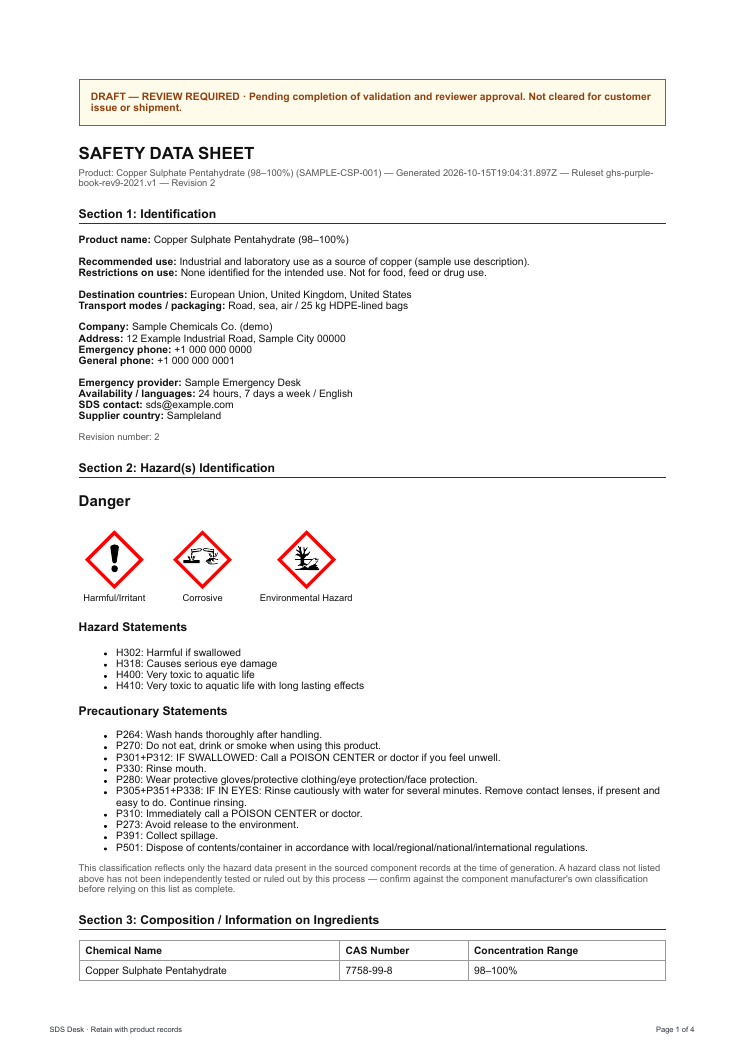
Classification, statements, and precautions
Chemical identity and concentration ranges
Safety paperwork should not depend on guesswork.
A wrong or outdated safety data sheet is more than an admin problem. It is the document people rely on to handle your product safely and that customs and customers ask to see.
Spreadsheets and old templates
Hazard text gets copied from one product to the next. Small edits drift, and nobody can say which wording is the right one.
Supplier SDS you cannot verify
Every supplier words things differently and rarely shows where a classification came from or how old the data is.
A consultant for every document
Fine for one product. Slow and expensive when you have a catalogue, and every change means another invoice.
Documents that quietly go stale
Regulations and compositions change. Without version history you cannot show which SDS you sent to which customer.
The right format
for the next step.
Prepare your product documentation without starting from a blank page each time.
Explore the workspaceSDS / MSDS
Safety information in a structured 16-section format
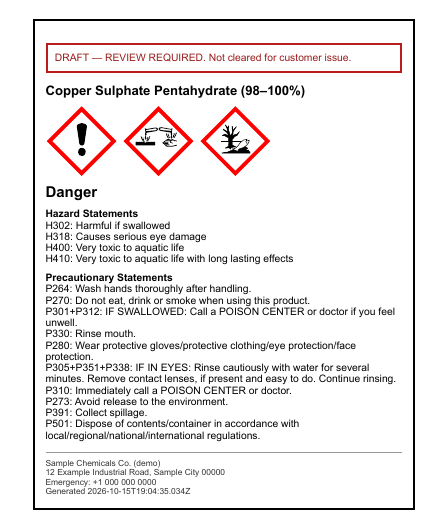
GHS label
Product identification and assigned hazard information
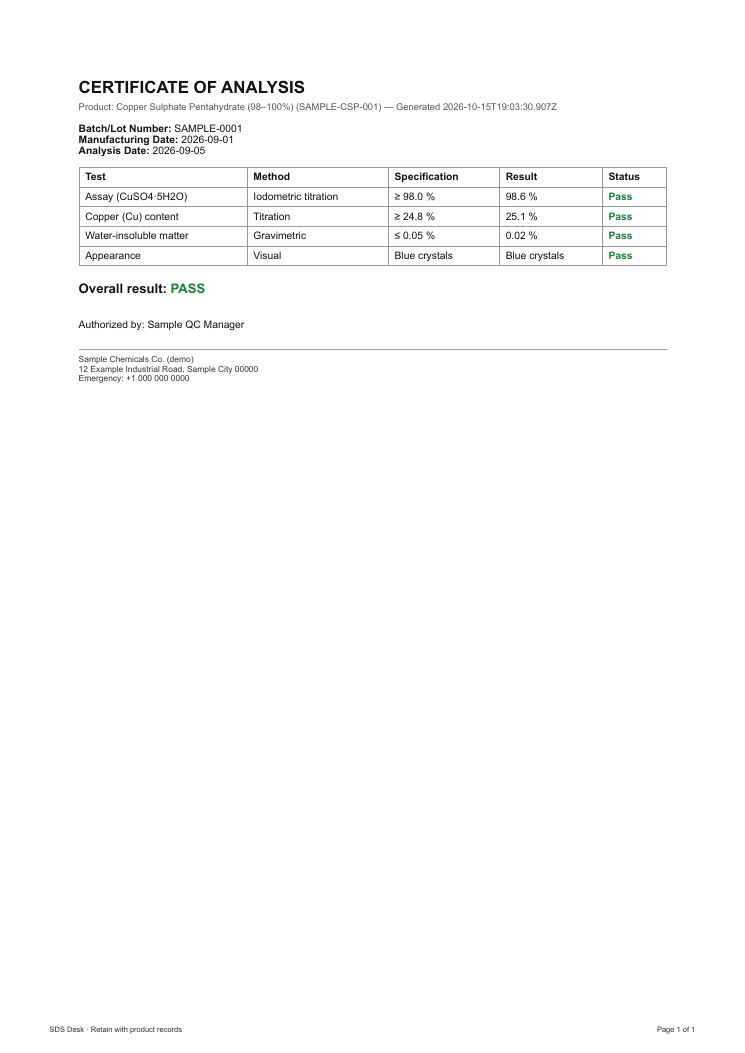
Certificate of analysis
Batch details and your actual test results
Product specification
Your product properties and acceptance criteria
From ingredients to a reviewed document in four steps.
Add your composition
Search ingredients by name or CAS number and enter each concentration range. You only need to know what is in the product.
We classify it from sourced data
The engine applies the UN GHS mixture rules to hazard records that carry their source and retrieval date. Missing data is flagged, never invented.
Review and approve
Check the signal word, pictograms and H and P statements section by section, then approve with your team before anything is issued.
Export and keep the record
Download a formatted PDF SDS, GHS label or certificate of analysis. Every version is saved with the classification behind it.
The tools a small chemical business actually needs.
No enterprise suite to implement and no per-document consultant fees. One workspace for your products, sources and documents.
Sourced chemical database
Hazard records from the EU harmonised classification (CLP Annex VI) and PubChem, each with a source link and retrieval date.
GHS mixture classification
Acute toxicity additivity, concentration cut-offs for skin and eye hazards, and the summation method for aquatic hazard.
Auditable calculation trace
Every result stores the ruleset version and which rule fired for which component, so you can answer "why is this Category 2?".
16-section SDS and GHS labels
Complete standard-format SDS and correctly laid-out labels with pictograms, signal word, and hazard and precautionary statements.
Certificates of analysis and specifications
Batch details and your own test results on a clean, consistent document, from the same product record.
Versioned PDF history
Edit, approve and restore with every saved version kept. Previews and downloads never count against your allowance.
Review and approval workflow
Invite your team with owner, admin, editor and viewer roles so the person who writes a document is not the only one who signs it off.
Built to cross borders
International GHS format as the starting point, with guides on EU CLP/REACH, OSHA HazCom and export checklists to help you adapt it.
Look at a real document before you sign up.
These samples were generated by SDS Desk for an example product. Open the PDFs and judge the structure, sources and wording yourself.
Made for businesses that need a handful of correct documents.
Chemical manufacturers
Keep one product record for every grade and pack size. Regenerate the SDS and label when a formulation changes and keep the earlier versions on file.
Importers and exporters
Prepare documents your customers and customs brokers ask for. Use the export checklist and CLP, REACH and HazCom guides to check what a destination expects.
Traders and distributors
Stop forwarding supplier PDFs you cannot verify. Build your own consistent documents from sourced data with your company details and emergency contact.
Laboratories and small teams
Produce certificates of analysis and specifications beside the SDS, with a clear review step before a document leaves the building.
A clearer alternative to templates and per-document fees.
| Spreadsheets & templates | Consultant per document | SDS Desk | |
|---|---|---|---|
| Where the hazard data comes from | Whatever was pasted last time | The consultant’s own sources | ECHA / PubChem, with source URL and date |
| Can you see how it was classified? | No | Depends on the provider | Yes, full calculation trace |
| Version history of issued documents | File names and folders | Depends on the provider | Every saved version kept |
| Missing data | Easy to overlook | Depends on the provider | Flagged, never filled with a guess |
| Team review before issue | By hand | Outside your workspace | Built-in approval step |
| Cost as your catalogue grows | Your time | Per document | Fixed monthly or yearly plan |
General comparison of typical approaches. Individual consultants and templates vary.
A wrong number on a safety document is a real-world risk.
That is why SDS Desk is built around sources, review and an audit trail instead of speed alone.
No invented hazard data
We do not let a language model make up classification numbers, CAS mappings or GHS codes. If a chemical has no confirmed harmonised classification, SDS Desk says so.
Evidence you can show
Source links, retrieval dates, ruleset versions and calculation traces are saved with the document, so an auditor’s question has an answer.
Your data stays yours
Each company has its own separate workspace. Two-factor authentication, revocable sessions and role-based access protect your product records.
SDS Desk is a documentation tool, not legal advice. Documents should be reviewed by a competent person before issue, and destination-specific requirements still apply.
Start free for 3 days. Pick the plan that fits your catalogue.
Every monthly or yearly plan begins with a 3-day free trial and you are not charged until it ends. Pay yearly and save 20%.
Starter
Independent chemical businesses getting their first documents in order.
10 documents per month
$19/month
Pro
A day-to-day documentation workflow for a growing catalogue.
50 documents per month
$49.90/month
Advanced
Teams coordinating a broader chemical catalogue.
200 documents per month
$99/month
Prices shown in USD before tax. Card required to start the trial; cancel before it ends and you pay nothing.
Learn the rules and look up common chemicals.
Guides
- How to Write a Safety Data Sheet (SDS): A Step-by-Step Guide
- The 16 Sections of a Safety Data Sheet (SDS) Explained
- GHS Label Requirements: Pictograms, Signal Words and Hazard Statements
- EU CLP and REACH Safety Data Sheet Requirements Explained
- Exporting Chemicals: A Safety Data Sheet and Labelling Checklist
Chemical hazard data
Harmonised classification, pictograms and H-statements for common industrial chemicals.
Browse all chemicals →Clarity before
you get started.
Is there a free trial?+
Yes. Every monthly and yearly plan starts with a 3-day free trial, with 1 document per day during the trial. A payment method is required to start it, you are not charged until the trial ends, and you can cancel before then from the billing page.
What does SDS Desk cost?+
Plans start at $19 per month (Starter, 10 documents per month). Pro is $49.90 per month for 50 documents and Advanced is $99 per month for 200 documents. Paying yearly saves 20%. Prices are shown before tax on the pricing page.
What counts as a document?+
Each saved version of an SDS, label, certificate of analysis or specification counts once, including edits, approvals and restores. Previews and downloads are free and the allowance resets on the 1st of each month (UTC).
Where does the hazard data come from?+
From the EU harmonised classification (CLP Annex VI, via ECHA) and PubChem. Every record keeps its source link and retrieval date. When a chemical has no confirmed harmonised classification, SDS Desk flags it instead of guessing.
Does AI decide my product’s hazards?+
No. The classification engine calculates supported hazard classes from component data using GHS mixture rules. Optional AI tools can help draft text, but these require review and estimates keep their provenance in the output.
Will my document be accepted in every country?+
SDS Desk uses an international GHS-format starting point. Destination-specific requirements, language, transport classifications and the completeness of your product data need qualified review before issue. Our EU CLP/REACH, OSHA HazCom and export guides explain what to check.
Can my team work in the same workspace?+
Yes. Invite team members as admin, editor or viewer. Company workspaces keep product records and document libraries separate, and only the owner manages billing.
What if I do not have all the data?+
Save a draft and continue later. Use your supplier SDS or published sources to complete the gaps. Documents with unresolved review issues are marked as drafts.
Is it secure?+
Accounts support two-factor authentication (authenticator app) and revocable sessions, and each company’s data is kept in its own workspace.
Can I cancel or get a refund?+
You can cancel from the billing page at any time. You will not be charged if you cancel during the 3-day trial. After the trial, payments are non-refundable, as set out in our refund policy.
Your next document starts here.
A clear workspace for your products, sources, and safety information.